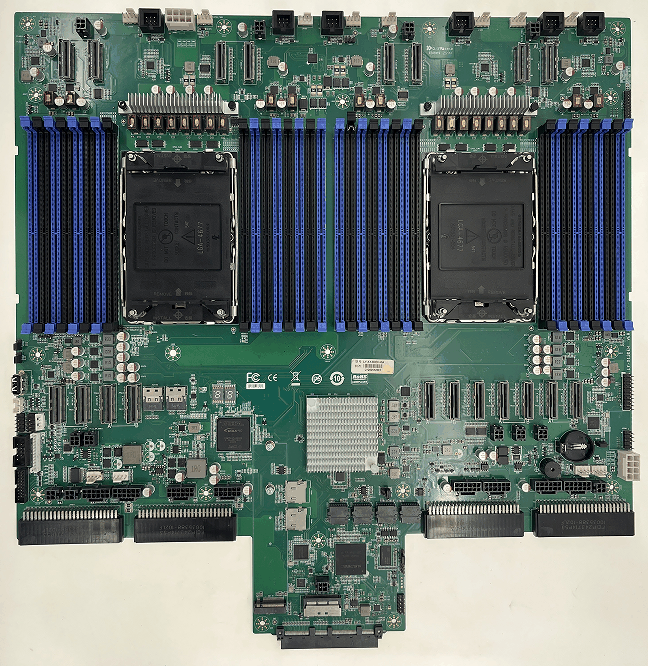
Pick the motherboard first, then the chassis—reverse the order and you'll often buy the wrong one. This article explains which chassis suit ATX, Mini-ITX, and E-ATX, and the matching details that are easy to overlook.
In the chassis selection process, "motherboard first or chassis first" is a fundamental question. In practice, some projects choose the chassis first and then look for a compatible motherboard. The result is often a limited range of motherboard options, or a compromise on overall configuration to fit the chassis.
Worse still, the chassis and motherboard have both been purchased, and only at assembly do you discover mismatched screw holes, an I/O shield blocking the ports, or the graphics card interfering with the drive cage. The return-and-exchange process then holds up the project. The right order is to settle the motherboard first, then choose the chassis to match its specs. This article goes through the mainstream form factors one by one, explaining which chassis suit ATX, Mini-ITX, and E-ATX and what to watch out for.
【Mainstream Form Factor Specs】
· ATX: 305×244 mm, the most mainstream spec, generally 4 to 7 expansion slots;
· Micro-ATX: 244×244 mm, shorter than ATX, 3 to 4 expansion slots;
· Mini-ITX: 170×170 mm, only one PCIe slot, with compactness as its advantage;
· E-ATX: 305×330 mm, wider than ATX, common in high-end workstations and dual-socket servers.
The "supported form factors" in a chassis spec sheet really indicate whether the internal tray dimensions can accommodate the above lengths and widths. At purchasing time, compare the motherboard's exact dimensions with the chassis's "maximum supported form factor" to complete the first round of screening.
Note that form factor size is a necessary condition, not a sufficient one. Two chassis both labeled ATX-compatible may differ significantly—one accepts a 330 mm graphics card, the other only 260 mm. So after the dimensions line up, further checks on expansion slots, cooling, and power are still needed.
【ATX Form Factor】
ATX is the default spec for tower chassis. The vast majority of mid-tower and full-tower cases support ATX and are downward-compatible with Micro-ATX and Mini-ITX. If the project has no extreme size constraints, an ATX motherboard in a tower chassis is a safe bet—plenty of expansion slots, generous cooling space, and convenient upgrades down the line.
ATX motherboards typically have 4 to 7 expansion slots, allowing a discrete GPU, NIC, capture card, and NVMe adapter to be installed simultaneously—suited to most general-purpose server and workstation scenarios. Four memory slots are common, ensuring both capacity and channel count.
Note that some products marketed as "compact ATX chassis" do support ATX motherboards but sacrifice expansion slot count or GPU length limit—expand the specs to confirm when buying. A practical approach is to ask the supplier directly about "the GPU length limit once this motherboard is installed," rather than relying on the headline of a marketing page.
【Mini-ITX Form Factor】
Mini-ITX offers only one expansion slot and typically just two memory slots, so its performance ceiling is lower than ATX. But it enables a much smaller build, suited to space-constrained scenarios including edge nodes, store servers, low-voltage cabinets, and desktop workstations.
A Mini-ITX motherboard needs an ITX-specific chassis. These share small size, tight airflow layouts, and cooler height limits usually lower than tower cases. A typical misconception is that a large cooler can be fitted into a small chassis at will, only to find the side panel won't close. With ITX chassis, selection must strictly follow the stated cooler height limit and GPU length limit.
Also, although ITX boards have only one PCIe slot, most edge and industrial scenarios need just one capture card or NIC, so a single slot is sufficient. Conversely, if the project may need expansion later, choose ITX cautiously—once the only slot is used up, there's no upgrade path.
The power supply is another special point for ITX builds. ITX chassis usually take SFX or FLEX small-form-factor PSUs, which aren't interchangeable with standard ATX supplies and offer a relatively limited wattage range. Factor the PSU spec into selection to avoid a mismatch at build time.
【E-ATX Form Factor】
E-ATX is 330 mm wide versus ATX's 244 mm; among tower chassis, only mid-tower or larger models with sufficient internal width can accommodate it. Before purchasing, make sure the chassis's official spec explicitly states "E-ATX supported"—don't rely on "it should roughly fit" as a judgment.
E-ATX motherboards are common in high-end workstations and dual-socket server platforms, with more expansion slots and wider memory channels, suited to compute-intensive scenarios. Accordingly, they place higher demands on chassis space, cooling, and power—a large board often means multiple expansion cards and several high-power chips, and a chassis configured to ordinary ATX standards may fall short on both cooling and power delivery.
In rackmount servers, E-ATX more often appears as server-specific form factors such as SSI EEB, paired with 2U or larger rack chassis. These aren't fully consistent with ordinary ATX in hole positions and I/O layout, so the corresponding server chassis must be used—they can't be mixed. This is especially worth noting when purchasing server boards: some look similar to ATX, but a slight difference in hole positions is enough to prevent installation.
【Matching Factors Beyond Form Factor】
Chassis selection can't rely on form factor size alone—the following three items must also be checked:
First, expansion slot blanks. The number of PCIe slots on the motherboard should correspond to the rear blank positions in the chassis. Empty slots without blanks let air and dust leak in; too few blank positions waste the motherboard's expansion capability. If you find an empty slot without a blank after assembly, add a blank plate to fill it.
Second, cooler and fan mounts. The form factor determines motherboard size, but cooling capability depends on the cooler sizes the chassis can hold and the number of fan mounts. High-power platforms need a chassis with good airflow design and plenty of fan mounts. Generally, a classic tower layout takes air in at the front and exhausts at the rear and top—count the fan mounts and their sizes when shopping.
Third, PSU spec. Tower cases mostly use ATX power supplies, rack chassis mostly use CRPS redundant supplies, and the two aren't interchangeable. Once the motherboard establishes platform power draw, the PSU wattage and spec follow. Allow a 20% to 30% power margin—this ensures stability at peaks and benefits long-term lifespan.
【Form Factor and Chassis Reference Table】
Motherboard Form Factor Size Recommended Chassis Typical Scenario
ATX 305×244 mm Mid-tower / full-tower General server, workstation
Micro-ATX | 244×244 mm | Compact tower / small rack | Entry server, NAS
Mini-ITX | 170×170 mm | ITX-specific small case | Edge node, store, low-voltage cabinet
E-ATX | 305×330 mm | Wide mid-tower / 2U+ rack | High-end workstation, dual-socket platform
Matching form factor to chassis is essentially an exercise in aligning dimensions and interfaces. It may seem trivial, but spending time checking before purchase avoids later problems like failed installation, returns, and structural modifications. A rule of thumb: settle the motherboard first, then work backward to the chassis based on its size, expansion slots, cooling, and power—not the other way around. With the right order, selection isn't complicated.
If your project uses an unusual form factor, or needs expansion slots and cooler sizes that don't match standard products, send us the motherboard model and expansion requirements. We've long specialized in chassis customization and barebone integration, and can recommend a matching chassis based on the form factor; small-batch prototyping can also be discussed.