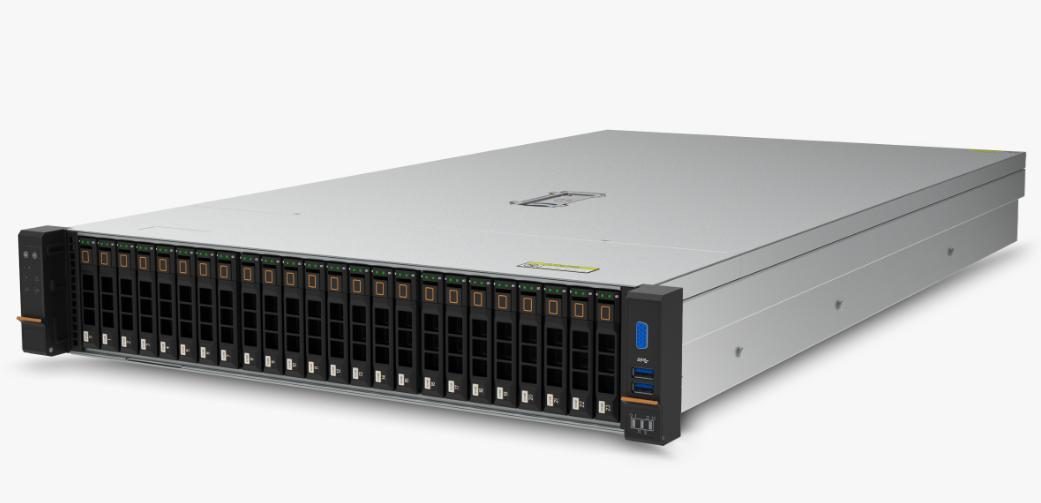
A 2U chassis is only 88.9 mm tall. Miss the form factor, cooler height limit, riser solution, or rack depth and you may have to redo the whole build. This article breaks down the key dimensions of 2U chassis selection one by one.
In the world of rackmount servers, the 2U form factor stands out for its selection complexity. 4U systems have ample internal space and can accommodate tower coolers and full-length expansion cards; 1U systems are compact, and buyers usually have clear expectations about their trade-offs. The 2U form factor, by contrast, is often burdened with dual expectations—saving rack space on one hand, while offering expansion and cooling capability close to that of a tower system on the other. This makes it a hotspot for selection problems.
A common scenario in practice goes like this: the budget, motherboard, and processor are all decided, and the chassis is chosen based only on the "2U" label. At assembly time, buyers discover the cooler height limit is too tight or the riser card doesn't match the expansion cards, forcing a configuration change or a chassis swap and delaying the project. Such problems can be avoided with a systematic check during selection. This article breaks down the key dimensions of 2U chassis selection one by one, from motherboard size to cooling clearance.
【The Physical Limits of the 2U Form Factor】
The U is the standard height unit for rack equipment: 1U equals 1.75 inches (44.45 mm), so 2U is 3.5 inches (88.9 mm), with a standard width of 19 inches. The 88.9 mm figure is the total height including the shell. After deducting the top and bottom panels, rails, trays, and necessary fan space, the net height available for the motherboard and cooler is typically between 70 and 80 mm.
This figure is the basic premise of selection. A common tower air cooler is about 150 mm tall—fine in a desktop environment, but hard to fit inside a 2U chassis. Therefore, the first task in choosing a 2U chassis is not confirming the "2U" label, but verifying whether the intended processor cooler can meet cooling requirements within the height limit.
As for whether a 2U chassis can accept a tower cooler, the answer is usually no—unless a specially designed downflow (low-profile) or passive solution is used. Once this physical boundary is clear, the rest of the selection logic follows smoothly.
【Matching Motherboard Size】
The motherboard form factors compatible with 2U chassis differ from the desktop ATX system. Common server form factors include:
· E-ATX: about 305×330 mm, a common spec for dual-socket server motherboards;
· SSI CEB / EEB: about 305×267 mm and 305×330 mm, server-specific specs widely used in 2U systems;
· ATX: 305×244 mm, highly versatile, mostly used in single-socket 2U solutions;
· Mini-ITX: 170×170 mm, compact but with limited expansion slots, suitable for lightweight nodes.
Before selection, check three things: whether the screw hole positions line up, whether the I/O shield opening matches the motherboard ports, and whether the PCIe slots align with the chassis expansion openings. If any of these don't match, the motherboard simply won't install properly.
Note that even among ATX motherboards, different vendors may vary in the position and size of the I/O shield opening. If the chassis rear opening is fixed, the shield may not align. A safer choice is a chassis with a replaceable I/O shield or a more universal opening.
On a dual-socket platform, the motherboard is usually larger, raising the bar for the internal layout of the 2U chassis. Such chassis often need a dedicated design and can't simply reuse a generic 2U solution. Dual-socket platforms also require side-by-side space for two processor coolers and must accommodate the memory slot layout demanded by the NUMA architecture—all of which are reflected in the chassis internal structure.
【Cooling Clearance and Processor Selection】
As mentioned, the cooler height limit in a 2U chassis is typically 70 to 78 mm. This clearance is adequate for processors with ordinary power draw, but if the project plans to use a high-TDP model, careful evaluation is needed—when power rises and cooling is insufficient, the processor will throttle frequently and fail to deliver its full performance.
2U chassis commonly use passive extruded-aluminum or heat-pipe downflow coolers, relying on the front-to-back airflow through the chassis to carry heat away. Note that a cooler doesn't work in isolation—its effectiveness is closely tied to chassis airflow. Two 70 mm coolers can differ by several degrees Celsius depending on whether the chassis airflow is smooth or turbulent.
Therefore, evaluate the processor model, TDP, and chassis airflow design as a whole rather than focusing only on the cooler height spec. A practical rule of thumb: first confirm the target processor's TDP, then check the chassis's stated "maximum supported processor power" and leave a 10% to 15% margin. If the spec sheet doesn't list this figure, ask the vendor to confirm.
Fan configuration also affects cooling performance. 2U chassis typically use 40 mm or 60 mm rear fans—high RPM and relatively loud, but with ample static pressure. Whether the fans are hot-swappable and support PWM speed control are also details worth checking: for equipment running 7×24, the ability to replace a failed fan without downtime directly affects business continuity.
【PCIe Expansion and Riser Solutions】
A 2U chassis has ample horizontal space but limited vertical space, so a full-height expansion card (about 111 mm tall) can't be installed upright. The solution is a riser card, which mounts the expansion card horizontally.
This has two implications: first, confirm the number of cards the chassis's riser solution supports, along with maximum card length and thickness; second, if using low-profile cards, most 2U chassis can mount them upright directly—a simpler approach.
Expansion devices such as GPU cards, capture cards, and 10GbE NICs generally must be installed via riser in a 2U chassis; card length and power connectors should be checked against the chassis solution in advance. Some high-performance NICs and accelerator cards are now two or even three slots thick, and once mounted horizontally the occupied height may exceed the riser's capacity—confirm this before purchasing.
As for whether a 2U chassis can accept a full-height GPU card, there's no one-size-fits-all answer—it depends on the riser solution and the specific card dimensions. Some 2U chassis come with GPU-specific risers and power routing and can support one or two low-power accelerator cards, but high-power full-size cards usually need a 4U or larger chassis to be safely accommodated.
【Storage, Power, and Rack Depth】
On storage, a typical 2U chassis offers eight 3.5-inch hot-swap bays or eight to twelve 2.5-inch bays, with backplanes in SAS and SATA varieties; NVMe support must also be confirmed separately. For virtualization or database nodes, the bay count and backplane bandwidth should be sized according to the workload.
Power supplies are usually CRPS redundant units in a 1+1 configuration, ranging from 450 W to 800 W, selected according to total system draw. Note that a redundant PSU can deliver full power when one module fails, but the daily load is best kept at 60% to 70%—the headroom covers peaks and also extends PSU lifespan.
Rack depth deserves even more attention: standard 2U chassis are mostly 750 to 800 mm deep, with short-depth versions at 600 to 650 mm. If the rack is shallow, a standard-depth system may not slide in—a problem often discovered only after delivery. Besides cabinet depth, allow for rear cable-routing space and PDU placement; the actual required depth is usually 50 to 100 mm more than the chassis's stated figure.
【Common Selection Pitfalls】
The most common mistakes in the selection process boil down to three:
1. Focusing on the label while ignoring specs: assuming any chassis marked "2U" will fit any 2U motherboard and cooler, without checking the form factor, height limit, and riser parameters;
2. Ignoring rack compatibility: failing to measure cabinet depth and rear cable space, so the system can't be installed on arrival;
3. Evaluating cooling in isolation: comparing only cooler heights without considering the actual cooling capability of chassis airflow and fan configuration.
All three can be avoided with a checklist during the selection phase.
【Quick Selection Reference】
Selection Dimension Common 2U Spec Key Check
Motherboard form factor CEB / EEB / ATX / E-ATX Check holes, I/O shield, PCIe positions
Cooler height limit approx. 70–78 mm Match to processor TDP, assess with airflow
PCIe expansion requires horizontal riser Confirm card length, thickness, quantity
Drive bays 8×3.5″ or 8–12×2.5″ Distinguish SAS / SATA / NVMe
Power supply CRPS redundant 450–800 W Size to total draw, leave 10–15% headroom
Rack depth standard 750–800 mm, short 600–650 mm Measure rack first, allow cable space
From selection to deployment, a 2U system appears to be a matter of choosing a chassis, but in reality it involves a whole set of matching relationships among form factor, cooling, expansion, power, and rack environment. Investing time in up-front checks effectively reduces later communication and rework costs.
If you have a 2U project still to be finalized, send us the motherboard model, processor power draw, bay requirements, and rack depth. We'll check each item and provide a configuration recommendation to help you avoid selection errors.